It lands in spam, or reads like a mailshot.
Bulk email tools send from their servers with marketing templates and tracking. Inbox filters notice, and so do people.

OutreachSheet is a Google Sheet that sends your outreach from your own Gmail, like a person, then follows up and sorts the replies for you. Pay once.
Built for Lightopia’s own sales: about 7,500 emails sent from one ordinary Google mailbox, about 440 responses.
Nothing to install. Launch price for the first 50 copies, then £49.
Inbox 0
Sent 48
Spam 0
For anyone who needs replies from people who don’t know them yet.
Bulk email tools send from their servers with marketing templates and tracking. Inbox filters notice, and so do people.
Many replies come from the second or third email. But remembering who to chase, and when, falls apart after the first twenty names.
Copying, pasting, changing the name, sending, logging. The part that matters, the conversation, gets the least time.
A subscription charges you for every month you prospect, whether you send 30 emails or 3,000.
Everyone gets the same email, and you still have to work out who replied, who bounced and who asked you to stop.
Plain, personal emails from your own Gmail, in your own words, with each person’s name and company filled in. No marketing template, no tracking pixel.
A few at a time, at natural gaps, only in the hours and days you choose. Your domain’s email records are checked before you start.
Your follow-ups go out on schedule, so nobody falls through the cracks.
Replies, out-of-office messages, bounces, spam blocks and unsubscribes are sorted for you. You get a short report every evening.
Anyone who asks to stop is never emailed again, even if they turn up in a list you import later. It understands opt-outs in 16 languages.
Put everyone in one list. Each person gets the version you wrote for their country: French for France, German for Germany, English for everyone else.
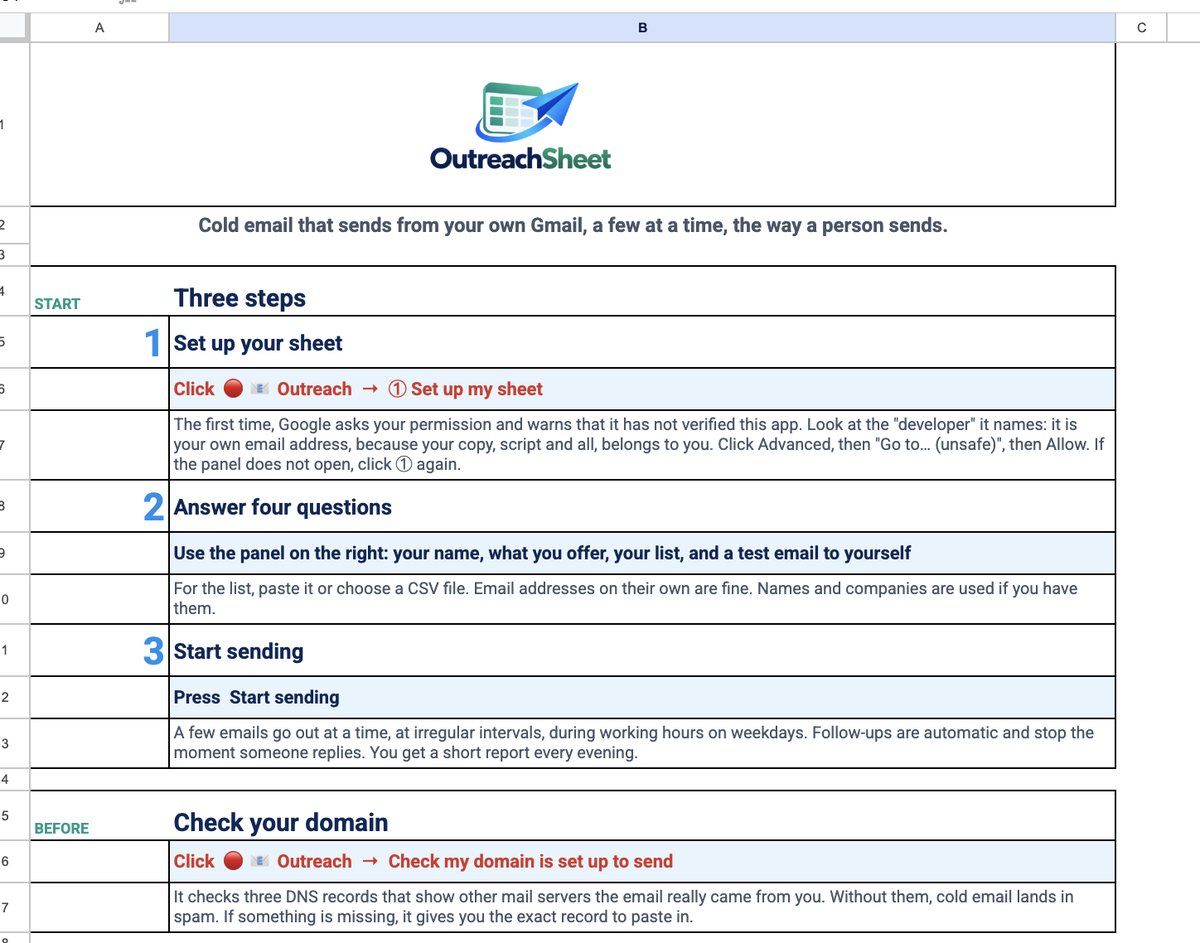
Open your link and click Make a copy. It’s a Google Sheet in your own Drive.
Your name, what you offer, your list (paste it or import a spreadsheet) and a test email to yourself. You see your first email exactly as your prospect will.
Try it in test mode first. Then it sends on your schedule and emails you a report every evening.
| Feature | Mailchimp | Brevo | GMass | By hand | OutreachSheet |
|---|---|---|---|---|---|
| Sends from your own Gmail | No | No | Yes | Yes | Yes |
| Personalised emails | Personalised marketing campaigns | Personalised marketing campaigns | Yes | Yes | Yes |
| Made for cold outreach | No, expects opted-in contacts | No, expects opted-in contacts | Yes | Yes | Yes |
| Automatic follow-ups | Yes | Yes | Yes (Premium) | You remember | Yes |
| Replies sorted for you | Marketing engagement reports | Marketing engagement reports | Reply tracking and campaign reports | No | Yes, by type |
| Each person in their own language, from one list | Conditional content | Conditional content | Conditional content | One by one | Automatic |
| How you pay | Plan-based pricing | Plan-based pricing | Subscription | Your time | £29, once |
Choose by workflow as well as price. See current plans: Mailchimp, Brevo and GMass. Language personalisation is available through Mailchimp conditional blocks, Brevo display conditions and GMass conditional content. OutreachSheet selects your prepared sequences using its editable country mapping. Reviewed 14 October 2026.
“The replies came back, because people could see a real person had written to them.”
Ian XiangFounder of Lightopia and OutreachSheet
Lightopia’s own outreach on the engine OutreachSheet is built from, as of 13 October 2026. Responses include replies, declines and opt-outs. Your results depend on your list and your offer.
I run Lightopia, a lantern festival brand, and most of my deals start with an email to someone who has never heard of me.
I tried Mailchimp, Brevo and GMass. None of them suited me. It wasn’t only the monthly fee. My emails didn’t land in the inbox, and few people opened them.
So I went back to sending from my own Gmail, by hand, like a person. The replies came back, because people could see a real person had written to them. But it took hours every day, and follow-ups slipped.
Mail merge sped things up, but every email was the same and I couldn’t see what came back. So I built my own, inside a Google Sheet: personal emails from my own Gmail, follow-ups on schedule, and every reply sorted.
Along the way I found one more thing. Writing to people in their own language made a big difference, so the sheet does that too.
Today it has sent about 7,500 emails from one ordinary Google mailbox. About 440 people have responded and 105 conversations are being worked on by hand. I check it once a day, from the report it emails me.
If you send a lot of outreach, I hope it saves you the hours it saved me.
Ian XiangFounder of Lightopia and OutreachSheet
No subscription and nothing to renew. The sheet, the engine and the manual live in your own Google account.
Your copy link arrives straight after payment. A copy can’t be handed back, so sales are final, but if OutreachSheet doesn’t work as described and we can’t fix it, you get your money back.
A lifetime licence for one user or business. Your copy never expires. Fixes to version 1 are free; major new versions may be sold separately. Secure checkout.
Still unsure? Email support@outreachsheet.com
No tool can promise that. OutreachSheet gives you the best chance: plain email from your own account, no tracking pixel, sent gradually, and a check of your domain’s email records. Your list and your message do the rest.
No, it works with a free Gmail address. But email from your own business domain (Google Workspace) is trusted more and tends to get more replies, so use one if you can. The domain check tells you whether it’s set up correctly.
Google lets a script send to about 100 people a day from a free Gmail account and about 1,500 from Google Workspace. OutreachSheet starts at a careful 30 new people a day, plus follow-ups, and you can raise it within your account’s limits. See Google’s current Apps Script quotas.
When you make your copy, the script inside becomes yours, so Google names your own email address as the developer. It shows this warning for any spreadsheet script that hasn’t been through its review for published apps. The script runs in your Google account using Google services; there is no OutreachSheet sending server. The manual walks you through each screen.
Yes. Most of what it does (personal emails from your Gmail, follow-ups, reply sorting, unsubscribes) has nothing to do with language. The language feature simply stays out of your way.
No. If you sell abroad, you write each language once (or have it translated), and the sheet sends the right version to each person. It comes with English and French ready to go.
Your list, emails, replies and logs are stored in your Google account and processed by Google services. There’s no OutreachSheet sending server.
It depends on who you email and where. In the UK, you can email companies if you offer an opt-out; emailing individuals, including sole traders, needs their consent. OutreachSheet handles opt-outs and keeps the record. You’re responsible for your list. This isn’t legal advice.
Your licence never expires, and fixes to version 1 are free. If version 1 ever stops working as described, for example because Google changes something, you’re emailed a corrected copy link at no charge. Major new versions with new features may be sold separately.
Sales are final once your copy link is sent, because a copy can’t be handed back. If it doesn’t work as described and we can’t fix it, you get your money back. Email support@outreachsheet.com if anything is unclear before you buy.
No. Gmail and Google Workspace only.
Launch price for the first 50 copies. Pay once, yours for life.
Practical guides for cold and warm outreach, whether you work in one language or several.
Plan a sequence, set the gaps and take over when someone replies.
02 · Google SheetsCompare Gmail’s built-in option, Google’s script sample and OutreachSheet.
03 · LanguagesPrepare each language once, then let the sheet select the version.